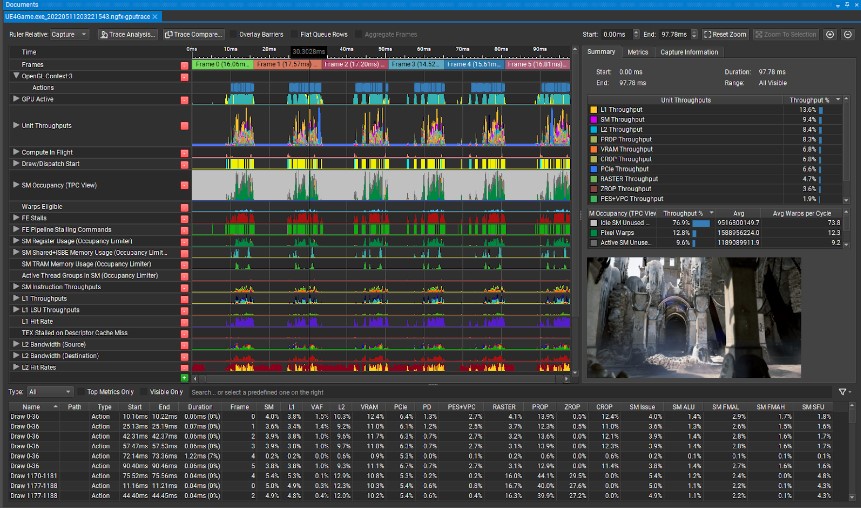
Improving GPU performance for AI workloads is an engineering discipline, not a one-time configuration change. The techniques that deliver the most consistent improvements target the same underlying constraints: reducing unnecessary memory bandwidth consumption, increasing arithmetic intensity, and eliminating overhead from kernel launches and CPU–GPU synchronisation. This article walks the practical steps in roughly the order most teams should apply them — but with a caveat we want to state up front: none of these steps replace profiling. They are the optimisations profiling typically points you toward, structured so you can apply them deliberately rather than by guesswork. For the profiling discipline that decides which step is worth applying first on a given workload, see our parent piece on how to profile GPU kernels to find the real bottleneck.
What actually limits GPU throughput in AI workloads?
Catalog the failure modes before selecting any optimisation technique. In our experience across inference and training engagements, the bottleneck is rarely “the GPU is too slow.” It is usually one of four things: weights and activations crossing HBM more often than they need to, the arithmetic units sitting idle while waiting for data, kernel launch overhead dominating small operations, or the CPU forcing the GPU to stop and report numbers it did not need to report yet. The techniques below — precision reduction, operator fusion, compiler-driven optimisation, memory-bandwidth tactics, and synchronisation hygiene — each attack one or more of those failure modes directly.
Step 1: Switch to FP16 or BF16
Video card throughput improves most when you eliminate stalls caused by memory subsystem constraints. Switching to FP16 or BF16 cuts memory bandwidth consumption for weights and activations in half and roughly doubles throughput on tensor core operations on Turing and later architectures — an observed pattern across the transformer and CNN workloads we have benchmarked in client engagements, not a vendor-specced number.
FP16 vs BF16:
| Format | Mantissa bits | Exponent bits | Range | Notes |
|---|---|---|---|---|
| FP32 | 23 | 8 | ±3.4×10³⁸ | Full precision baseline |
| FP16 | 10 | 5 | ±65,504 | Can overflow on gradients without loss scaling |
| BF16 | 7 | 8 | ±3.4×10³⁸ | Same range as FP32, less precision |
| TF32 | 10 | 8 | ±3.4×10³⁸ | NVIDIA internal format, A100+ only |
BF16 is generally preferred for training because it has the same exponent range as FP32, which avoids the overflow problems that motivate gradient loss-scaling under FP16. FP16 is widely supported on all Turing and later hardware and is adequate for inference on most production models.
Enable mixed precision in PyTorch using automatic mixed precision (AMP):
# Training with automatic mixed precision (AMP):
scaler = torch.cuda.amp.GradScaler()
with torch.autocast(device_type='cuda', dtype=torch.bfloat16):
    output = model(input)
    loss = criterion(output, target)
scaler.scale(loss).backward()
scaler.step(optimizer)
scaler.update()

# Inference only:
model = model.to(torch.float16)
# or
with torch.autocast(device_type='cuda', dtype=torch.float16):
    output = model(input)
The observed-pattern range we see when teams migrate FP32 transformer inference to FP16/BF16 on Turing-or-later silicon is 1.5–2× sustained throughput improvement — measured end-to-end, not just inside the kernel. Workloads dominated by elementwise operations or unfused custom code sometimes see less, which is the next thing to look at.
Step 2: Operator fusion via torch.compile
Fusion removes intermediate writes to HBM that would otherwise occur between consecutive operations. Without fusion, a sequence such as LayerNorm → Linear → GELU → Linear generates four separate kernel launches, each reading from and writing to GPU memory. Fused execution keeps intermediates in registers or L2, cutting HBM round-trips and, more importantly, kernel-launch overhead — which can dominate when individual ops are small.
torch.compile is the recommended entry point:
model = torch.compile(model, mode="max-autotune")
The max-autotune mode runs autotuning across kernel configurations. It adds compilation time on the first run — minutes for large models — but produces better steady-state throughput than reduce-overhead.
Compile-mode trade-offs:
| Mode | Compilation time | Throughput improvement (observed pattern, transformer inference) |
|---|---|---|
default |
Moderate | 10–20% typically |
reduce-overhead |
Fast | 5–15% — targets Python-side overhead |
max-autotune |
Slow | 20–40% on supported architectures |
For inference servers where first-request latency matters, warm up the compiled model before serving traffic:
# Warm up to trigger JIT compilation
with torch.no_grad():
    for _ in range(5):
        _ = model(dummy_input)
A note on the numbers above: those improvement bands are observed-pattern ranges from PyTorch’s own published benchmarks and from our engagements, not a guarantee for your model. Models with heavy Python-side dispatch overhead see the high end; models that were already fusion-friendly via cuDNN or FlashAttention see the low end.
Step 3: XLA compilation (TensorFlow and JAX)
The XLA compiler generates fused GPU kernels from linear algebra expressions, cutting memory round-trips. In TensorFlow:
@tf.function(jit_compile=True)
def inference_step(x):
    return model(x, training=False)
In JAX, XLA compilation is the default via jit:
import jax
import jax.numpy as jnp

@jax.jit
def forward(params, x):
    return model.apply(params, x)
XLA’s impact varies by model. CNNs and transformers with static shapes typically see 20–40% throughput improvement (as reported in benchmarks); models with complex control flow or dynamic shapes see less benefit because each new shape triggers recompilation, and that compilation cost can exceed the runtime gain.
Limitations. XLA performs ahead-of-time compilation for a fixed computation graph. Dynamic shapes — variable sequence lengths, variable batch sizes — require recompilation on each new shape. Use static shapes with padding where possible, or accept the recompile cost only on shapes that recur often enough to amortise.
Step 4: Memory bandwidth optimisation
Most inference tasks saturate memory bandwidth well before exhausting arithmetic units. The GPU is waiting for weights and activations from HBM rather than running out of compute. The practical levers:
Reduce model precision (covered in Step 1). FP16 reads half the bytes of FP32. For weight-loading-bound workloads — meaning small batch sizes against large models — this directly doubles effective throughput.
Quantisation beyond FP16. INT8 weights consume 25% of FP32 memory bandwidth for weight loading. INT4 consumes 12.5%. Arithmetic still happens in INT8 or INT4 with dequantisation before accumulation, which is the basis for AWQ, GPTQ, and llama.cpp’s GGUF quantisation. Quality impact is workload-dependent — evaluate on your downstream task before committing.
Improve cache reuse. Accessing the same data multiple times within a kernel benefits from L2. Tile-based algorithms for matrix operations exploit spatial and temporal locality in L2. The L2 cache on A100 is 40 MB; on H100 it is 50 MB. Weights for a 1B-parameter model at INT8 — about 1 GB — do not fit in L2, so weight loading remains fundamentally bandwidth-bound at that scale. cuDNN, FlashAttention, and the kernels emitted by torch.compile’s Triton backend handle this for you; hand-written kernels usually do not without effort.
Increase batch size to amortise weight loading. At batch size 1, weights are loaded from HBM to perform a single multiply-accumulate per weight element. At batch size 32, the same weight load serves 32 computations — arithmetic intensity rises 32×, and the operation transitions from memory-bound to compute-bound. We cover the batching argument in more detail in our companion piece on how to increase GPU performance for AI.
Step 5: Reduce CPU–GPU synchronisation
Calls to .item(), .numpy(), or .cpu() introduce synchronisation barriers that stall the pipeline. It blocks the host until the GPU finishes all pending work and transfers the result. In tight inference and training loops, these synchronisations serialise the pipeline and eliminate the benefit of asynchronous CUDA execution.
# Bad — forces a sync on every iteration
for batch in dataloader:
    output = model(batch)
    loss_val = loss.item()    # Sync point
    print(loss_val)           # Forces CPU transfer

# Better — accumulate on device, sync less frequently
total_loss = 0.0
for i, batch in enumerate(dataloader):
    output = model(batch)
    total_loss += loss        # Stays on GPU
    if (i + 1) % 100 == 0:
        print(total_loss.item())  # One sync per 100 batches
This is one of the failure modes profiling surfaces quickly. Nsight Systems shows it as long, regular gaps between kernel executions on the CUDA stream timeline — gaps that disappear once the offending host-side reads are removed or batched.
GPU performance improvement checklist
Apply this ordering as a heuristic, never as a replacement for empirical data. Apply, profile, then move on.
- Is the model running at FP32 when FP16/BF16 would be accurate enough? → Switch precision (Step 1).
- Is
torch.compileapplied? → Apply withmax-autotuneand warm up (Step 2). - Is XLA
jit_compileenabled for TensorFlow or JAX? → Enable per function or globally (Step 3). - Are there frequent
.item()or.cpu()calls in the inference loop? → Eliminate or batch them (Step 5). - Is the batch size optimised for GPU utilisation against the latency SLA? → Increase until tensor cores saturate or SLA binds.
- Is quantisation applied (INT8 weights for memory-bound inference)? → Evaluate quality impact before shipping.
- Are CUDA streams used to overlap computation and host-device transfers?
- Is
pin_memory=Trueset in the DataLoader for faster H2D transfer?
FAQ
How do I tell whether my GPU kernel is compute-bound, memory-bound, or host-bound?
Use Nsight Compute on a single kernel of interest to read its arithmetic intensity and roofline position — a kernel sitting on the memory-bandwidth ceiling is memory-bound, one on the compute ceiling is compute-bound. For host-bound or I/O-bound workloads, Nsight Systems is the right tool: it shows gaps on the CUDA stream timeline that correspond to host-side work or transfers, not kernel execution.
Which GPU profiler should I use — Nsight Systems, Nsight Compute, or vendor alternatives?
Start with Nsight Systems for end-to-end timeline analysis (what is happening across CPU, GPU, and transfers), then drop into Nsight Compute for per-kernel detail once the timeline shows you which kernel matters. For non-NVIDIA hardware, the vendor equivalents — ROCm’s rocprof, Intel’s VTune for GPUs — fill the same two roles.
What does it mean when GPU utilisation looks high but end-to-end throughput is low?
nvidia-smi utilisation reports the fraction of time a kernel is resident on the SMs, not how efficiently the kernel uses them. A memory-bound kernel that stalls on HBM reads still reports near-100% utilisation (as defined by the metric) — in our experience a directionally useful but not operationally precise indicator. Sustained throughput under realistic load — not the utilisation percentage — is the operationally relevant measure.
How do I read a profiler trace to identify the real bottleneck rather than a symptom?
Look for the longest single contiguous gap or kernel on the timeline first and ask why it exists. Symptoms are gaps; bottlenecks are the upstream cause — a stalled kernel might be waiting on a transfer, which is waiting on a host-side computation. Trace backward from the gap, not forward from the first kernel.
When does profiling reveal the bottleneck is outside the kernel (host, I/O, batching, transfer)?
More often than teams expect. In our engagements, a large share of “GPU too slow” reports turn out to be host-side data preprocessing, inefficient batching, or H2D transfer overhead rather than the kernel itself. The signal is the same in every case: long gaps on the CUDA stream between kernels.
Once I’ve identified the bottleneck, what is the optimisation order that gives the largest speedup first?
If the kernel is memory-bound, precision reduction and quantisation give the largest single step. If it is compute-bound, operator fusion via torch.compile or XLA is usually next. If the gap is on the host timeline, fix synchronisation and transfer patterns before touching the kernel at all.
Synthesis
Begin with FP16 or BF16 conversion (immediate, minimal risk), proceed to compiler-driven fusion through torch.compile or XLA (modest investment, substantial benefit), then optimize memory bandwidth using quantisation and access-pattern corrections. CPU–GPU synchronisation overhead is a frequently overlooked bottleneck that profiling reveals quickly. Each step should be measured before and after — in our experience, the compound application of these techniques typically doubles effective throughput compared to an unoptimised FP32 baseline on the same hardware, but the order in which you apply them should be decided by what your profiler tells you, not by the order of this article. The discipline of profiling first, optimising second is what separates targeted performance work from engineering by superstition. That discipline is what we run formally as a GPU Performance Audit for teams who want the ranked plan, not just the profiler screenshots.