Introduction
Modern enterprises rarely train models in-house; instead, they consume pre-trained intelligence through vendor endpoints. AI APIs let developers add intelligent behaviour to applications without building model infrastructure from scratch. A team can wire up natural language understanding, image recognition, or sentiment analysis through a handful of HTTP calls instead of standing up training pipelines. In our experience, that shift in default — “consume a model” rather than “train a model” — is what makes most production AI projects viable.
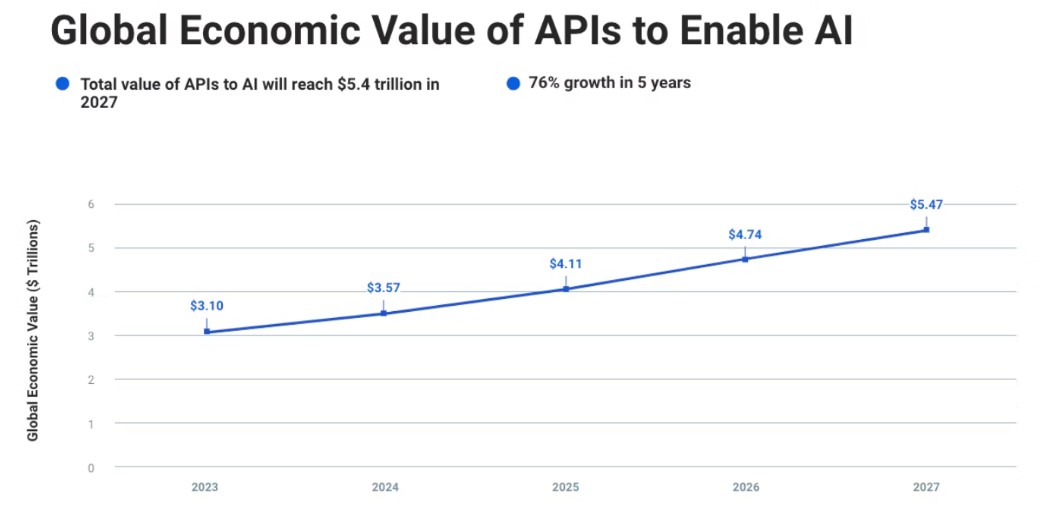
Adoption is concentrated in healthcare, finance, and customer service, but the surface is widening fast. Kong’s API economy report projects the AI API market growing from $3.1 trillion in 2023 to $5.4 trillion in 2027 (market-direction; analyst estimate, not an operational benchmark). The number itself matters less than the trajectory: AI capability is increasingly delivered as a service, and the integration discipline matters more than the model choice. This article walks through what AI APIs actually do, how they work under the hood, and how to integrate them without painting yourself into a corner.
What is an AI API?
An AI API is a packaged interface that exposes one or more machine-learning models behind a stable contract — usually REST or gRPC. The caller sends input data (text, image, audio, structured features), the API runs inference, and the response carries the model’s output. The model lifecycle, the training data, the GPUs, the autoscaling — all of that sits on the provider’s side of the boundary.
Two flavours are worth distinguishing because they imply very different integration patterns:
| API flavour | What it exposes | Typical use |
|---|---|---|
| AI-based API | Direct access to an AI service (vision, NLP, speech) as the core capability | Add a new modality your app didn’t have — OCR, transcription, image tagging |
| AI-enabled API | A traditional API enhanced internally by an ML model | Existing search, recommendation, or ranking endpoint that now uses a learned ranker |
The distinction matters at design time. An AI-based API is a new dependency you are taking on deliberately. An AI-enabled API is often invisible — you are calling what looks like a normal endpoint, but its behaviour shifts as the underlying model is retrained. The second case quietly demands more monitoring than teams expect.
How do AI APIs work under the hood?
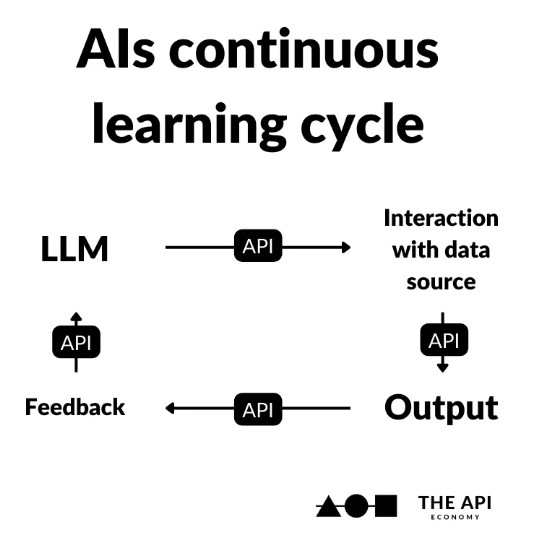
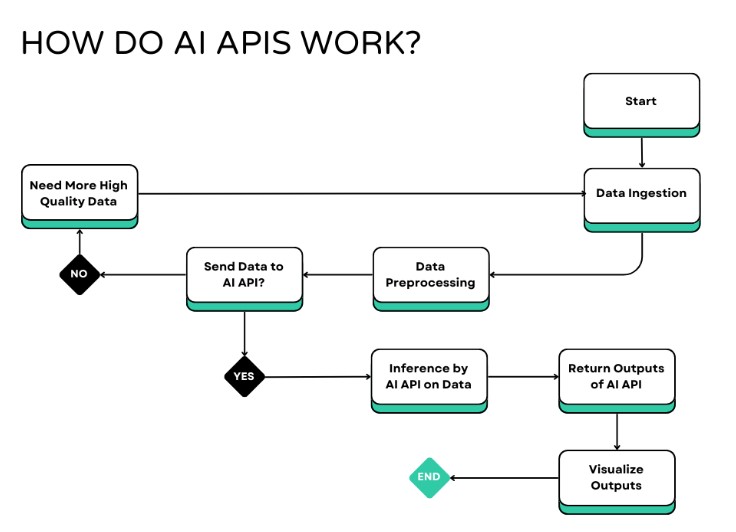
The mechanics are less mystical than the marketing suggests. A request hits the API gateway, the payload is preprocessed (tokenisation for text, resizing and normalisation for images, feature scaling for tabular inputs), and the preprocessed tensor is dispatched to a model server. The model runs inference, the output is postprocessed (decoded, thresholded, formatted), and the response is returned.
Where things diverge is the deployment topology. Two patterns dominate, and the choice has real cost and latency consequences:
- Cloud-hosted inference. The request travels to a remote server — usually a managed service like Google Cloud AI, AWS AI Services, or Microsoft Azure AI. The provider absorbs the scaling burden and you pay per call. This is the default for high-volume batch work, for models too large to run locally, and for use cases where 100–500 ms of network latency (a typical tolerance range, in our experience) is acceptable.
- Edge or on-premises inference. The model runs on the device or inside your own infrastructure. Latency drops to single-digit milliseconds, data never leaves your perimeter, and you stop paying per call — but you take on capacity planning, model packaging, and hardware management. This is the right call for autonomous vehicles, industrial vision, healthcare devices, and any workload where data residency is non-negotiable.
The cloud-versus-edge call is rarely binary. A common pattern we see in practice is to run lightweight perception or filtering at the edge — a small detector that decides what is worth a closer look — and forward only the interesting payloads to a heavier cloud model. That hybrid layout gives most of the latency benefit of edge with most of the capability of cloud, and it tends to win on cost once volume scales up.
Where AI APIs actually get used
The use-case surface is broad, but three categories cover most production deployments.
Image recognition APIs

Image recognition turns pixels into structured signal — bounding boxes, labels, OCR text, embeddings for similarity search. The scale of image traffic in security systems, retail analytics, and industrial inspection makes this category one of the heaviest API consumers in the field.
The major options have meaningfully different strengths:
- Google’s Cloud Vision API is strong on detailed analysis — OCR, label detection, object localisation, document parsing.
- Amazon Rekognition leans into video pipelines and content moderation, with solid SDK coverage across AWS.
- OpenAI Vision shifts the contract: instead of structured labels, you get free-text descriptions of image content, which is useful for accessibility and search but harder to validate programmatically.
- Microsoft Azure AI Vision bundles vision with custom model training, which matters when out-of-the-box labels don’t fit your domain.
Choosing among them is rarely about benchmark scores. It is about how the response shape matches what your application needs to do next, and how easy the failure modes are to handle.
Natural Language Processing (NLP) APIs
Natural Language Processing (NLP) APIs cover entity extraction, sentiment scoring, summarisation, classification, and conversational understanding. The practical question is usually whether you need a generalist (a large language model behind a chat endpoint) or a specialist (a sentence-level classifier with a tight schema). The two have very different cost and latency profiles.
- IBM Watson NLP does structured text analysis well — entities, relations, sentence parsing.
- Amazon Comprehend is built for high-volume text processing with declared data-privacy controls.
- Google’s Natural Language API covers entity, sentiment, and syntax analysis with a clean REST surface.
For anything beyond the basics, teams increasingly reach for foundation-model APIs (OpenAI, Anthropic, Cohere, Mistral, Google Gemini) and treat the older NLP APIs as the lower-cost fallback. That mix-and-match approach lets you push expensive reasoning to the LLM and route the cheap, repetitive classification to a smaller endpoint.
Machine learning model APIs
Once a team trains its own model, the question is how to expose it. Three platforms dominate, each with a distinct philosophy.
Frameworks and tools for serving your own models
TensorFlow Serving
TensorFlow Serving is Google’s open-source model server. It accepts TensorFlow models (and, with some configuration, other formats), exposes them over HTTP REST or gRPC, and handles model versioning, request batching, and canary rollouts natively. It is the right tool when your team controls the model artefact end-to-end and wants a stable, well-understood serving layer.
Amazon SageMaker
Amazon SageMaker is the broader managed equivalent — notebooks, training jobs, debugging, profiling, MLOps, and inference endpoints in a single AWS console. The endpoint abstraction is its real value: you point it at a trained model, and it provisions, scales, and monitors the inference fleet. For teams already on AWS, the integration cost is low. For teams that aren’t, the lock-in is real.
Read more: Introduction to MLOps
Azure Machine Learning
Azure Machine Learning covers the same surface from Microsoft’s side, with first-class support for PyTorch, TensorFlow, and Scikit-learn. The platform pushes hard on automated featurisation, hyperparameter search, and distributed training. Endpoints expose models as REST services, with the usual scaling and monitoring hooks.
Hugging Face Transformers
Hugging Face Transformers is the open-source library that turned pre-trained NLP models into a commodity. The Hub hosts tens of thousands of models for text generation, classification, question answering, and increasingly vision and audio. The library itself doesn’t deploy anything — you either use the Hugging Face Inference API, host the model yourself, or wire it into SageMaker or Azure ML for managed serving. Most teams we work with end up running a hybrid: the Hub for discovery and prototyping, then a dedicated serving layer for production.
Steps to integrate AI APIs into your application
Integration is more disciplined than most teams expect on the first pass. A workable sequence looks like this:
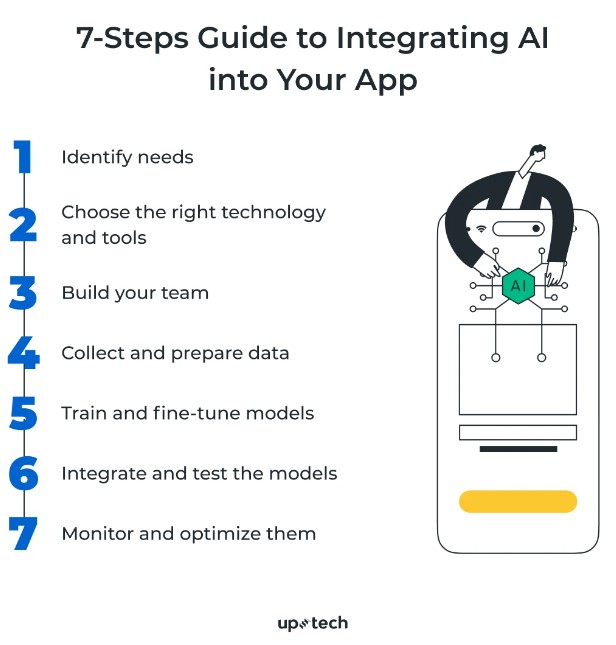
- Define the capability. Name the specific behaviour you are adding — “extract invoice line items from PDFs,” not “use AI.”
- Select the API. Match the response shape, latency budget, data-residency constraints, and SDK availability against your stack. Reliability and rate limits matter more than benchmark scores.
- Prepare the data. Get the input format clean and consistent before the first integration test. Outdated or malformed inputs are the most common failure source we see.
- Train or fine-tune if needed. If you are using a generic API, skip this. If you are deploying your own model behind a serving framework, this is where most of the calendar time goes.
- Wire it into the application. Build the preprocessing, the API call, the postprocessing, and the user-facing surface. Treat the API call as an external dependency from day one — retries, timeouts, circuit breakers.
- Test the integration end-to-end. Unit tests for the wrapper, integration tests against a sandbox key, and load tests against the rate limit.
- Monitor and iterate. Track latency, error rate, cost per call, and — critically — output quality over time. Model drift on the provider’s side is invisible until you measure it.
Best practices and common failure modes
A few patterns separate integrations that age well from ones that don’t.
Read the documentation properly. Authentication flows, rate limits, error semantics, and request size limits are where surprises hide. Skim-reading the quickstart and skipping the rest is the single most common cause of late-stage rework.
Treat data protection as a design constraint, not a checklist. GDPR and CCPA compliance shape what you can send to a cloud API, where you can log it, and how long you can retain it. HTTPS, key rotation, rate limiting, and regular security audits are the floor.
Plan for throughput, not just functionality. Batch requests where the API supports it. Cache idempotent responses. Use asynchronous processing for anything the user isn’t actively waiting on. Monitor usage against the rate limit before you hit it, not after.
Design for failure. Every external AI service will fail at some point — outages, throttling, regional incidents, deprecated model versions. User-friendly error messages, structured logging, alerting, and retry logic with exponential backoff are baseline. For high-stakes paths, have a fallback provider or a graceful-degradation mode.
The deeper failure modes are subtler. Over-reliance on a single GPT-class provider concentrates risk in a way that is invisible until the provider has an incident. Prompt engineering — for LLM-backed APIs — is a real skill, and its outputs are sensitive to model updates the provider can make without notice. And data quality remains the largest determinant of outcome: poor inputs will produce poor outputs no matter how strong the model is. Working through these is where an experienced solutions partner earns their keep.
How does TechnoLynx help with AI API integration?
At TechnoLynx we build custom software with AI capability baked in from the design phase, rather than retrofitted afterwards. Our work spans edge computing, IoT (Internet of Things), computer vision, generative AI, GPU acceleration, natural language processing, and AR/VR/XR.
The integration patterns above are the ones we apply day-to-day on engagements scoped to a specific outcome. Whether that means selecting between cloud and edge inference, wiring a foundation-model API into an existing product, or building a custom serving layer on SageMaker or Azure ML, we own the engineering end-to-end. If you are weighing how AI APIs fit into your roadmap, contact TechnoLynx and we can talk through the specifics.
Conclusion
AI APIs are no longer a novelty; they are the default delivery vehicle for machine learning capability. The pace of advancement in NLP and vision models means the integration discipline — selection, monitoring, failure handling, cost control — is now where the real engineering work lives. The model itself is increasingly a commodity. How you wrap it, observe it, and recover from it is what determines whether the system holds up in production.
For teams thinking about where to start, the answer is usually narrower than the initial ambition: pick one specific capability, integrate it cleanly, measure the outcome, and expand from there.
Frequently Asked Questions
What is an AI API and how does it differ from a regular API?
An AI API exposes a machine-learning model behind a standard interface, usually REST or gRPC. A regular API runs deterministic code with predictable outputs; an AI API runs a probabilistic model whose outputs can shift as the provider retrains it. The integration mechanics look similar, but the monitoring discipline differs sharply — model drift is a failure mode that traditional APIs don’t have.
Should I use a cloud AI API or run inference at the edge?
Cloud APIs are the default for high-volume batch work, large models, and use cases where 100–500 ms of latency is acceptable (as a rule of thumb for cloud round-trip). Edge or on-premises inference wins on latency, data residency, and per-call cost, but transfers the operational burden to your team. A hybrid layout — light filtering at the edge, heavy reasoning in the cloud — is common in practice and usually the right answer once volume scales up.
Which AI API providers should I evaluate first?
For vision, Google Cloud Vision, Amazon Rekognition, OpenAI Vision, and Microsoft Azure AI Vision cover most needs. For NLP, IBM Watson, Amazon Comprehend, and Google’s Natural Language API handle structured analysis; foundation-model APIs from OpenAI, Anthropic, Cohere, and Google Gemini cover open-ended generation. Choose on response shape and failure semantics, not benchmark numbers.
What are the biggest risks when integrating AI APIs?
Over-reliance on a single provider, invisible model drift on the provider’s side, poor input data, and missing fallback paths are the four most common. All four are integration-level concerns rather than model-level concerns, which is why the wrapping code around the API call usually matters more than the API choice itself.
Sources for the images
- CSolitair. (n.d.) ‘Natural Language Processing’, Github.
- Hassanin, N. (2023) ‘Law professor explores racial bias implications in facial recognition technology’, University of Calgary.
- Nikolaieva, A. (2024) ‘How to Integrate AI Into Your App: 7 Steps Guide’, Uptech.
- Pulsifer, E. (2023) ‘The Economic Impact of APIs: API Monetization, AI, Web3, and Beyond’, Kong.
- Schroeder, P. (2023) ‘AI & APIs’, Apifirst.
Further Reading and Resources
Integrating AI APIs into your business requires consulting multiple authoritative sources beyond this introduction. What Are AI APIs, and How Do They Work?. [online] Dataversity.
- Pulsifer, E., 2023. The Economic Impact of APIs. [online] KongHQ.
- Simpson, J., 2020. 7 Best Image Recognition APIs. [online] Nordic APIs.
- Srivastava, V., 2022. 10 Natural Language Processing (NLP) APIs. [online] Nordic APIs.
- Uptech, 2024. How to Integrate AI into Your App: Comprehensive Guide. [online].