A multi-object tracker is not an inspection system. It is a layer on top of one. The decision that actually matters on a manufacturing line is upstream: do you build the perception layer on a rule-based machine vision platform (Cognex, Keyence, Basler with a deterministic pipeline) or on a learned computer vision system (a CNN-based detector trained on your defect classes, deployed on industrial GPUs or edge accelerators)? Tracking — re-identifying the same widget as it moves frame-to-frame, or following the same operator’s hands across a workstation — only earns its place once that upstream question is answered. We see teams get this backwards routinely: they shop for a “YOLO + DeepSORT” stack before they have decided whether their problem is even a learned-vision problem.
This article walks the decision in the right order. We explain where AI-based tracking actually adds value on a production line, how it sits relative to a traditional machine vision inspection cell, and what the structural trade-offs look like when you have to commit. For the broader inspection-approach decision — the one that determines which vendor and which capex line item you are about to commit to — see our companion piece on machine vision vs computer vision for manufacturing inspection.
What does object tracking actually buy you on a production line?
Does this image contain a scratch? That question exhausts the scope of frame-level detection. That’s what detection resolves. Tracking answers “is this the same part I saw three frames ago, and what is its trajectory through the cell”. Those are different jobs and they have different failure modes.
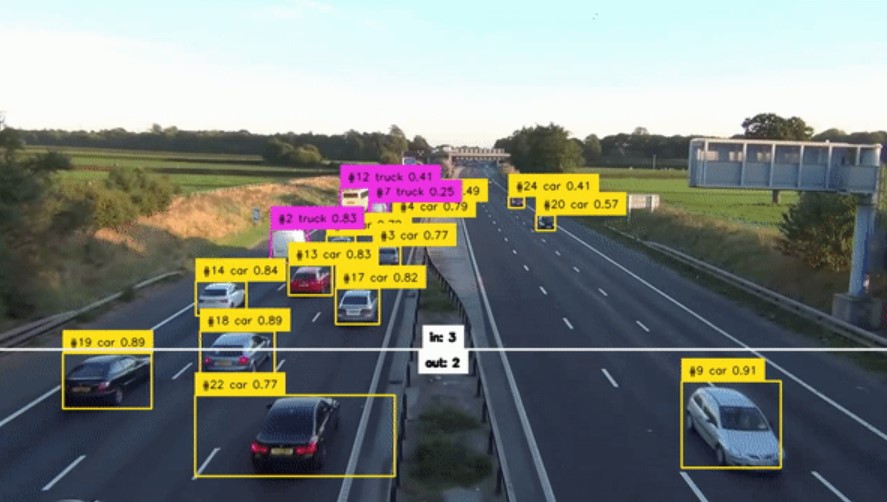
On a fast-moving conveyor with parts entering and leaving the field of view, a pure detector running per-frame will happily report the same defective bottle six times in six frames. That is fine for a reject solenoid triggered on any positive — the deterministic machine vision world has been doing this for thirty years with a simple part-present signal and a fixed-position trigger. It is not fine when you want to count defects per shift, attribute them to a specific part ID, or correlate them with upstream process telemetry. That correlation requires a stable identity across frames. That is tracking.
Tracking earns its place when at least one of these is true:
- Parts dwell in the field of view long enough that double-counting is a real risk (slow conveyors, hand-paced assembly, robotic pick cells).
- Multiple parts share the frame and need to be distinguished (mixed-SKU bins, retail self-checkout, tote-level logistics).
- The downstream system needs trajectory, not just presence (collision avoidance on AGVs, ergonomic analysis of operator motion, lane-discipline checks on warehouse traffic).
- You need re-identification after occlusion (a part passes behind a fixture and re-emerges; tracking holds the ID, detection alone does not).
If none of these is true, tracking is overhead you do not need. A trigger-and-inspect machine vision cell with a deterministic algorithm will outperform a learned tracker on cost, latency, and auditability. This is the structural point we keep returning to: tracking is a capability you add when the geometry of the problem demands it, not a default.
How tracking sits relative to the machine vision vs computer vision decision
Hardware vendors lock vision processing to proprietary platforms, coupling optics, compute, and software into closed stacks. You calibrate lighting, fix the trigger position, choose a tool (blob, edge, pattern match, OCR), and get a pass/fail signal. The decision is auditable in the strictest sense: every pixel-level rule that produced the verdict can be inspected and re-run. The cost is brittleness — a 2 mm shift in part position or a lamp degradation can break the pipeline silently.
Learned computer vision (a YOLO-family detector, a segmentation network, a vision transformer trained on your defect corpus) tolerates that variation. The cost is opacity. You cannot point to the rule that triggered the verdict; you can only point to training data, validation metrics, and a confidence score. For regulated industries that is a real problem, and it is one we cover in the companion decision article.
Tracking layers on top of either base, but the integration story differs sharply:
| Aspect | Tracking on machine vision | Tracking on learned CV |
|---|---|---|
| Identity assignment | Usually trivial — fixed trigger gives one part per inspection event | Required — detector outputs a fresh box per frame, identity has to be solved |
| Algorithm class | Often handled by PLC-level part counters and shift registers, not vision | SORT, DeepSORT, ByteTrack, BoT-SORT, OC-SORT |
| Occlusion handling | Rarely needed — fixturing controls geometry | Required — appearance embeddings and motion models hold ID across gaps |
| Latency budget | Tight, deterministic (sub-10 ms typical) | Looser; tracker adds 5–20 ms on top of the detector on a modern edge GPU (observed-pattern in our deployments, not a benchmark) |
| Auditability | Full; PLC log + image archive | Partial; tracker decisions are inspectable but not deterministic across re-runs |
The takeaway: if your inspection problem is well-fixtured and rule-tractable, you almost certainly do not need a learned tracker. If your problem requires learned perception in the first place, then tracking is the natural extension once you need cross-frame identity.
What does a working multi-object tracker actually look like?
Most factories today pair a per-frame object detector with a lightweight association algorithm to recover identity across time. The detector (YOLOv8, YOLOv11, RT-DETR, or a domain-specific model) produces bounding boxes per frame. A separate tracker associates those boxes across frames using a combination of:
- Motion prediction — a Kalman filter or constant-velocity model that predicts where each tracked object should appear in the next frame.
- Appearance embedding — a learned feature vector per detection (the “Deep” in DeepSORT) so that two visually similar boxes in adjacent frames can be matched even if motion prediction fails.
- Association — the Hungarian algorithm or a greedy IoU-based matcher that pairs predictions with detections under a cost matrix.
ByteTrack is the current pragmatic default for industrial work where you have a strong detector and predictable motion. DeepSORT remains useful when appearance variation is high and you need re-identification after long occlusions. The Ultralytics package ships both behind a single model.track() call, which is convenient but hides the choice — and the choice matters when you start hitting failure modes.
The common failure modes in production:
- ID switches under crossing trajectories. Two parts pass close on a conveyor, the tracker swaps their IDs, and your per-part defect attribution is now wrong. Fix: tune the IoU and appearance thresholds; constrain with domain priors (parts cannot reverse direction).
- Track fragmentation under occlusion. A part passes behind a robot arm for 12 frames; the tracker drops the ID and assigns a new one on re-emergence. Fix: increase the
max_ageparameter; rely more heavily on appearance embeddings. - Phantom tracks from detector false positives. A detector flickers on a reflection; the tracker dutifully creates an ID and follows nothing. Fix: raise detection confidence threshold or add a minimum-hits gate before a track is published.
None of these are exotic problems. They are the bread-and-butter of getting a tracker into production, and they are why “drop in YOLOv11 and DeepSORT” is a starting point, not a finished system. Validation against your actual line — your lighting, your parts, your conveyor speed — is non-negotiable. This is an observed-pattern across our manufacturing engagements, not a benchmark figure.
What is machine vision, and why does the answer change tracking architecture?
Decades of factory integration produced a closed world: fixed lighting, known parts, and edge filters tuned by specialists. It is built around fixed cameras, controlled lighting, hardware triggers, and rule-based image processing. The reason this matters for tracking is that machine vision systems typically do not need a vision tracker at all — the PLC already knows which part is at which inspection station because the conveyor encoder told it. Identity is solved by mechanical and electrical means, not by perception.
When you move to a learned computer vision deployment — typically because variation in parts, lighting, or defect appearance defeats the rule-based approach — you lose that free identity signal. The camera is no longer at a fixed trigger position; the part is no longer guaranteed to be at a known location. You now need a tracker to recover what the conveyor encoder used to give you for free. That is the cost of leaving the deterministic world, and it is worth pricing into the decision up front.
For a complete walkthrough of when each approach wins — including cost, throughput, defect-type complexity, and auditability factors — see our machine vision vs computer vision decision framework. The short version: if your defects are well-defined, your parts are well-fixtured, and your auditability requirements are strict, machine vision wins and tracking is a non-issue. If you face appearance variation that defeats rules, learned CV wins and tracking becomes a required component of the perception stack.
A worked example: YOLO-based tracking in OpenCV
Three imports—torch, cv2, ultralytics—bootstrap a tracking pipeline capable of learning appearance features from annotated video. This is illustrative — it is not a production deployment. Production work requires validation on your line, latency profiling, integration with PLC or MES, and a defined failure-handling path.
from ultralytics import YOLO
import cv2

model = YOLO("yolo11x.pt")
cap = cv2.VideoCapture(0)

while cap.isOpened():
    ret, frame = cap.read()
    if not ret:
        break

    # persist=True keeps track IDs stable across frames
    results = model.track(frame, persist=True, conf=0.3, iou=0.5)
    annotated = results[0].plot()

    cv2.imshow("tracking", annotated)
    if cv2.waitKey(1) & 0xFF == ord("q"):
        break

cap.release()
cv2.destroyAllWindows()
A few notes on what is hidden in model.track(): it defaults to ByteTrack, runs the detector at the chosen confidence threshold, and assigns persistent IDs only when persist=True. The IoU threshold governs association; raising it makes the tracker more conservative about matching across frames. None of these defaults are right for every line — they are a starting point for a profiling exercise.
Where AI tracking adds real value outside the inspection cell
Defect detection occupies one camera station; cycle-time analysis, part routing, and robot handoff each require persistent identity.
- Workstation flow analysis — Tracking operator hands and parts at a manual assembly station to time cycles, identify ergonomic risk, and find the bottleneck step. The variation here defeats rule-based vision; learned CV with tracking is the right tool.
- AGV and forklift coordination — Tracking moving assets across a warehouse for collision avoidance and route optimisation. This is closer to autonomous-vehicle perception than to factory inspection.
- Mixed-SKU counting and sortation — When parts share a conveyor and need per-SKU counts, the tracker carries the SKU classification from the detection frame through the rest of the part’s journey.
- Quality correlation — Linking a detected defect at one station to the same part’s earlier images at upstream stations, so that root-cause analysis has a coherent trace. This is the highest-value use of tracking we see in the field; it requires identity persistence across multiple cameras.
For the broader picture of how computer vision fits into quality control workflows, see computer vision for quality control in manufacturing.
What TechnoLynx works on
Learned vision systems replace brittle heuristics when products vary, lighting shifts, or occlusion breaks the assumptions behind classical algorithms. Our work spans GPU programming for high-throughput inference, edge deployment for latency-bound cells, and integration with PLC and MES so that the vision verdict actually drives the line. We engage where the decision between machine vision and learned CV is non-obvious and where the cost of the wrong choice is measured in scrapped product or audit findings. More on the shape of that work sits on our Computer Vision R&D practice page.
FAQ
Machine vision vs computer vision: which inspection approach fits my manufacturing line?
Machine vision fits when defects are well-defined, parts are fixtured, lighting is controlled, and auditability is strict. Computer vision fits when appearance variation defeats rule-based pipelines. Most lines benefit from a hybrid: deterministic machine vision for go/no-go gates, learned CV for nuanced defect classes. The decision framework in our companion article walks the five factors that drive the choice.
What is machine vision, and how does it differ from a custom computer vision system?
Machine vision is the deterministic, hardware-coupled discipline built around fixed cameras, controlled lighting, and rule-based image processing — Cognex, Keyence, MVTec HALCON. A custom computer vision system is a learned model (typically a CNN or transformer) trained on your specific defect corpus and deployed on GPUs or edge accelerators. Machine vision is auditable and brittle; custom CV is adaptive and opaque.
When does a Keyence or Cognex-style machine-vision system beat a custom CV deployment?
When defects are geometrically or photometrically well-defined (dimensional checks, presence/absence, OCR, fixed-pattern matching), when the line tolerates strict fixturing, and when the validation team is small and not ML-literate. Off-the-shelf machine vision wins on time-to-line, on maintainability by non-ML staff, and on the auditability story for regulated environments.
How much does a vision inspection system cost across machine-vision versus custom-CV options?
Costs vary widely by line complexity, but the structural split is: machine vision is capex-heavy (cameras, lighting, smart-camera units, integrator time) with low ongoing cost; custom CV is engineering-heavy up front (data collection, labelling, model training, validation) with ongoing maintenance for model drift. We treat specific quoted figures as observed ranges from our engagements, not benchmarks — every line is different.
Is computer vision AI/ML, and does the answer change the procurement path?
Modern computer vision is overwhelmingly ML-based — deep neural networks trained on labelled images. Classical computer vision (without learning) still exists and overlaps heavily with machine vision. The procurement path changes because ML-based CV is a custom engineering project, not a vendor-platform purchase. Budget, timeline, and acceptance criteria all look different.
Which production constraints (latency, lighting, throughput) push the decision one way or the other?
Tight latency budgets (sub-10 ms, as a sizing threshold) and controlled lighting push toward machine vision. High part-to-part variation, complex defect classes, and tolerance for 20–50 ms inference (a rule of thumb) push toward learned CV. Very high throughput with simple defects favours machine vision; moderate throughput with subtle defects favours learned CV. Tracking enters the picture only once the perception layer is decided.
References
The Simple Online and Realtime Tracking (SORT) lineage—Bewley, Wojke, Paulus—underpins nearly every commercial tracking SDK shipping today. (2017). Simple online and realtime tracking with a deep association metric. IEEE ICIP.
- Zhang, Y. et al. (2022). ByteTrack: Multi-object tracking by associating every detection box. ECCV.
- Jocher, G., Qiu, J., & Chaurasia, A. (2023). Ultralytics YOLO. github.com/ultralytics/ultralytics
- Steger, C., Ulrich, M., & Wiedemann, C. (2018). Machine Vision Algorithms and Applications (2nd ed.). Wiley-VCH.